


Free social media marketing course lesson 6
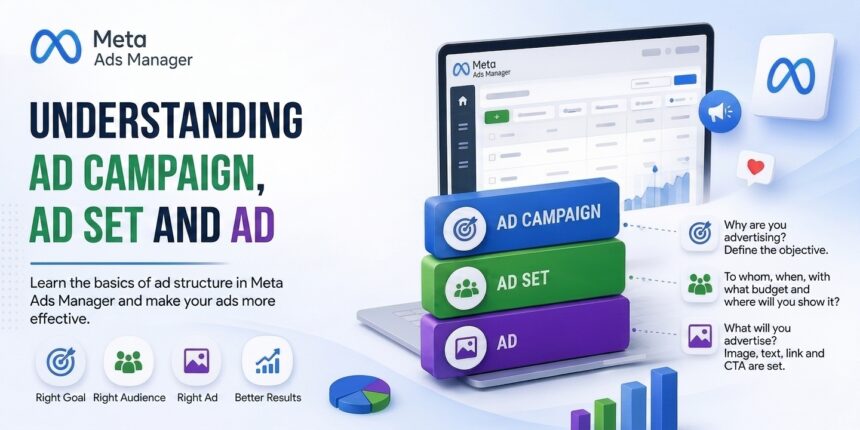
One of the topics that beginners in social media marketing have the most difficulty with is distinguishing the concepts of campaign, ad set, and ad in the Meta Ads Manager panel. Many users cannot fully understand what these three concepts mean and how they differ from each other. In this lesson, you will learn what a campaign, an ad set, and an ad are in Meta Ads Manager, the differences between them, and how they work. By learning the differences between a campaign, an ad set, and an ad, you will learn how to work more efficiently with the Meta advertising structure. If you have also just started in social media marketing or want to improve your current advertising results, this lesson is important for you.
What is a Campaign?
A campaign is the foundation of all your advertising activities. This is where the advertising objective is mainly selected. In the lesson called Meta Ads Manager Campaign Objectives, I provided detailed information about advertising objectives. In other words, with a campaign, you answer the question, “What do I want to achieve with this ad?” to the system. For example, you can choose one of the following campaign objectives.
- Awareness (Brand Awareness) — Show the brand to more people
- Traffic — Drive people to your website or app
- Sales — Sell products, receive service orders
- Engagement — For example, receive messages from customers
Example: Let’s say you are advertising a clothing store. And you want people to send you messages about your product. Then you can choose the Engagement objective. This is the objective of the campaign, and the system also sets up all of its steps according to this objective.
What is an Ad Set?
An ad set is contained within the campaign, and this is where you define the technical details. In short, you define who the ad will be shown to, how much budget you want to spend on the ad, the duration of the ad, and on which platforms and placements the ad will appear in the ad set. You can create more than one ad set within a campaign. These ad sets can have different target audiences, budgets, and end dates. The technical details of one ad set do not affect another ad set.
Each ad set can target a different audience. This gives you the opportunity to test ads. For example, you can show the same post to both men and women in separate ad sets and see who is more interested in the ad. Or you can prepare different ad sets suitable for each age group. Pay attention to the example below.
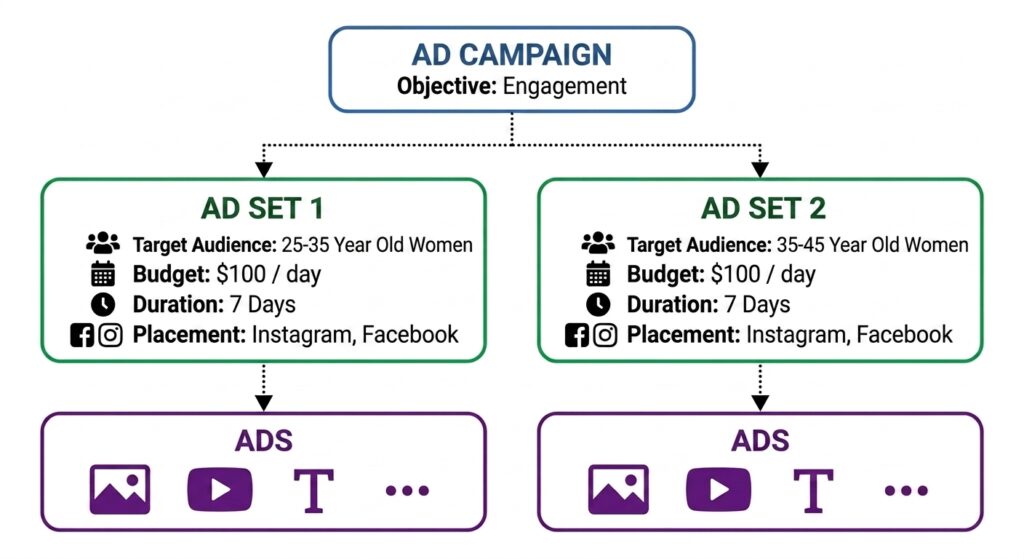
Let’s assume you are going to advertise the products of a store that sells women’s clothing. The campaign objective has been selected as Engagement. And you create two ad sets within the campaign. Since the products in your store differ according to age groups, you want to show your products to the audience suitable for that age group. You run ads in one ad set for women between the ages of 25–35, and in another ad set for women between the ages of 35–45.
Thus, you have created two ad sets with the same campaign objective. Each ad set has been shown to a different audience. This will look approximately like the diagram shown below.
What is an Ad?
Finally, we have reached the last stage, which is the ad stage. The ad section is the section where you determine what you want to advertise. In other words, with the campaign we determine the objective of the ad, with the ad set we determine who we will show the ad to, and with the ad we determine what we will advertise. The main elements of the ad section are as follows.
- Select the ad creative – Image or video
- Headline and description – Ad copy
- Link – Where the person who clicks will be directed
- CTA button – Shop Now, Sign Up, Send Message, etc.
All of these elements are the elements through which you can influence the customer. By using these elements correctly, you can significantly influence the customer’s purchase decision. To understand the campaign, ad set, and ad, the table below and the information in the table will be useful for you.
| Campaign | Determines the objective | Determines why you are running the ad and what you expect from this campaign. |
| Ad Set | Determines who, when, with what budget, and where the ad will be shown | Used to select a detailed target audience, plan the budget, choose the ad placements, and determine the duration. |
| Ad | Determines what you will advertise | Determines what you will advertise, with which creative (video or image), and where you will direct the customer. |
Do not forget that in Meta Ads Manager, the campaign, the ad set, and the ad together make up the Meta advertising structure. Understanding this structure correctly will help your ads become more efficient and results-oriented. To better understand this structure, we can compare it to a store with another example.
Think of a store. This store has two display windows. Each display window contains different products. In this example, the store represents the campaign, the display windows represent the ad sets, and the products in the display windows represent the ads.
You now have a better understanding of what a campaign, an ad set, and an ad are in Meta Ads Manager, and the differences between them. Correctly understanding these three fundamental concepts will directly affect how targeted, efficient, and results-oriented your ads are.