


Free YouTube Monetization Course – Lesson 22
Creating content on YouTube is not just a hobby, it can also be a serious source of income. However, to earn money from your videos, you need to connect your YouTube channel to an AdSense account. In this lesson, you will learn how to connect your YouTube channel to a Google AdSense account, what requirements you need to meet, and the entire process step by step in a clear and understandable way.
Requirements for Connecting Your YouTube Channel to an AdSense Account
To connect your YouTube channel to an AdSense account, you must first meet the requirements of YouTube’s Partner Program (YPP) and enter the application process. You cannot go directly to AdSense like a website and connect your channel. The process is carried out through YouTube Studio. To start the AdSense connection, you must have reached the numbers in one of the following two options:
- Option A: 500 Subscribers + 3,000 Watch Hours in the Last 12 Months
- Option B: 1,000 Subscribers + 4,000 Watch Hours in the Last 12 Months (or 10 Million Shorts Views in the Last 90 Days)
Option A: “Halfway There” (Fan Funding)
This option is like an “early retirement” opportunity for channels that have not yet reached very large audiences but have loyal followers. At this stage, you can connect AdSense, but the money deposited into your account does not come from ads. Only direct payments from your viewers, such as “Super Thanks” or “Channel Memberships”, accumulate in your AdSense account. YouTube is gradually rolling out Fan Funding features (Option A) worldwide. Click here to check if Fan Funding is active in your country. If your channel location is among the listed countries, you can use these features.
Option B: “Full Access” (Ad Revenue)
This is YouTube’s traditional and primary target stage. This is where you start earning a share of the ad revenue. If your YouTube channel has 1,000 Subscribers + 4,000 Watch Hours in the Last 12 Months or 10 Million Shorts Views, you can earn money from ads displayed on your YouTube videos. Even if you reach the numbers, if any of the following conditions are not met, the AdSense connection cannot be established:
- You are under 18 years old
- Two-Step Verification is not enabled on your YouTube channel
- Your channel has an active strike
If any of these situations apply, you cannot connect your channel to your AdSense account and cannot benefit from ad revenue.
Detailed Information About Connecting Your YouTube Channel to AdSense
You can learn all the necessary steps to connect your YouTube channel to your Google AdSense account from the video below. If the video does not open in a language suitable for you by default, you can change the language in the video settings and follow the steps described to connect your YouTube channel and AdSense account smoothly. Pay attention to the screenshot below to change the video language.
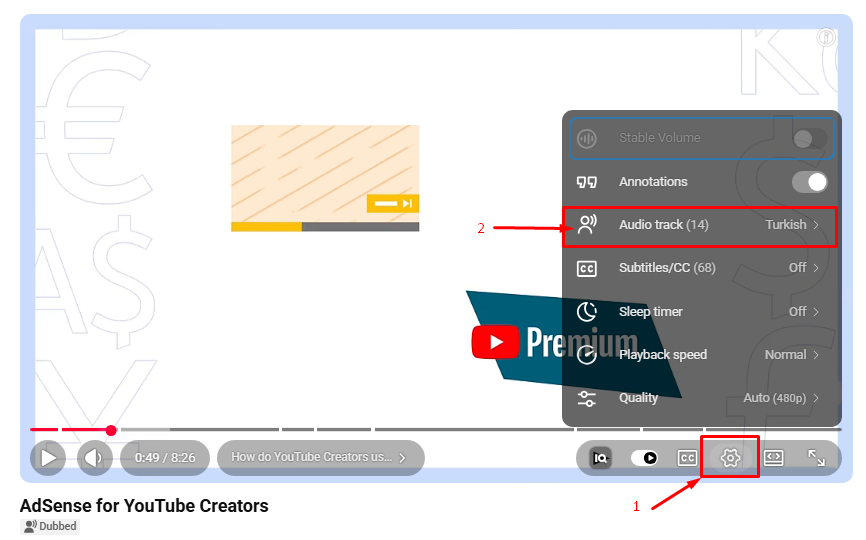
In this lesson, you learned the requirements, options, and step-by-step process for connecting your YouTube channel to your Google AdSense account. Now you can assess which stage your channel is at, choose the option suitable for you between Fan Funding or Ad Revenue, and complete the AdSense connection smoothly. By continuing to create regular and high-quality content, you can confidently continue your journey to earning revenue.