


Free YouTube Monetization Course – Lesson 15
For YouTube videos to rank higher in searches and to appeal to a wider audience, it is necessary to carry out SEO efforts. There are many SEO tools we can use for SEO efforts on YouTube. The most commonly used of these SEO tools is the vidIQ SEO tool. I gave a brief explanation about the vidIQ SEO tool in our lesson titled What is the vidIQ SEO tool? What is vidIQ used for? In this lesson, we will learn how we can do keyword research with the vidIQ SEO tool.
- Free YouTube Monetization Course – Lesson 15
- Why should I do keyword research? What are the benefits of keyword research?
- How is keyword research done for YouTube videos?
- YouTube keyword research first step
- YouTube keyword research second step
- Rules for using keywords and hashtags in YouTube videos.
- Extra information
Why should I do keyword research? What are the benefits of keyword research?
When people search for information, they use words that define that information. These words are keywords. For YouTube videos to rank high in searches and for the video to appear among recommended videos, correct keywords must be used. Keywords are one of the fundamental factors that affect the view count of the video, the increase in the performance of the YouTube channel, and the increase in the number of subscribers. For this reason, we should do keyword research.
How is keyword research done for YouTube videos?
If you have read this far, it means you have learned how important keywords are. Now, how can we research keywords? We will learn where and how we should use keywords. Let’s assume that your YouTube channel is a travel channel. Today you will share a video from your Azerbaijan trip. Let’s do keyword research for this video together and use these keywords in the video.
YouTube keyword research first step
First, we search by typing “travel vlog” on YouTube. You will see the vidIQ panel on the right side of the screen. In this panel, information about this keyword is given. The gauge-shaped chart shows the estimated SEO value you can obtain in SEO work with this keyword. Our keyword is evaluated with a score of 61 out of 100. However, we can reach a higher value than this.
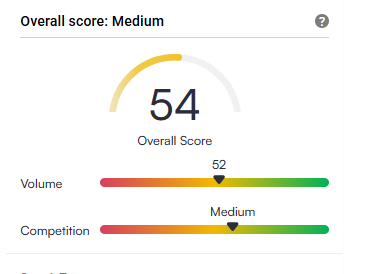
Below the SEO evaluation, the search volume and competition volume of this keyword are visible. Search volume and competition volumes express completely separate ideas.
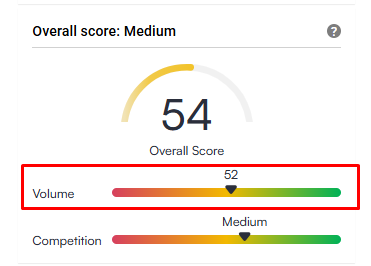
Volume
Keywords with high volume are keywords that are frequently searched and that users show interest in. The higher the volume of a keyword, the higher the probability of appearing in searches and the probability of appearing among recommended videos. By measuring search volume, you can also research the topic of your new videos. If you need to choose between several topics while selecting a video topic, you can address the topic of the keyword with high volume by doing keyword research.
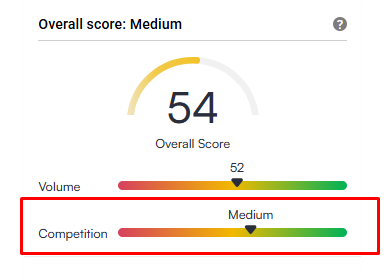
Competition
The competition indicator shows the competition of a keyword. That is, it shows how many videos have been shared with this keyword before you. Keywords with low competition and high volume can provide you with more benefit. However, do not give up on a video idea that could be very good just because a keyword has high competition. These indicators only give you possibilities related to your video.
A little further down, there is other information related to the keyword you searched for. This information gives detailed information about the usage of the keyword.
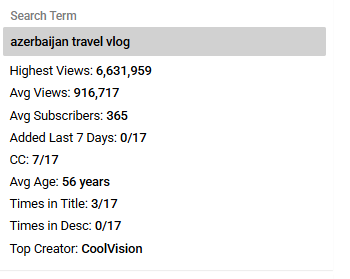
Let’s understand the information in this panel
Highest Views:
It reflects the highest views of a video in which this keyword is used. That is, the keyword you searched for is used in a video and that video has been watched at the maximum displayed number.
Avg. Views:
It reflects the average views of a video in which this keyword is used.
Avg. Subscribers:
It shows the probability of the number of subscribers that this keyword can bring to the video. However, most of the time this scale does not work correctly. For this reason, you may not take this into account.
Added in the Last 7 Days:
It shows how many videos were uploaded with this keyword in the last 7 days.
CC – Subtitles:
It shows how many of the videos in which this keyword appears have subtitles.
Avg. Age:
This indicator is often misunderstood. The age here does not show the age of the viewer, but the popularity age of the keyword. That is, it shows how many years this keyword has been popular.
Times in Title:
This indicator shows how many videos use this keyword in the title.
Times in Desc:
This indicator shows how many times the keyword is used in video descriptions.
Top Content Creator:
This indicator shows the channel in which this keyword is used the most and that has a high number of subscribers. By benefiting from this indicator, you can also do competitor research.
Below these indicators, you can see other YouTube channels in which the keyword you searched for is used. You can also use these channels in competitor research.
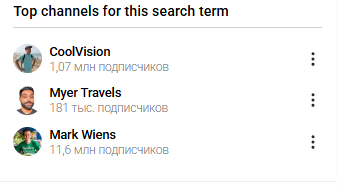
Below the suggested channels, you can also see other keywords related to the keyword you researched. We will use the keywords in this section in the title, description, and tags of the video. One keyword here will be useful for us. We copy and save these keywords.
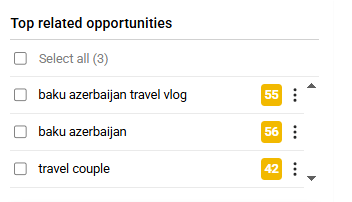
Since the vidIQ SEO tool has a free version, you see three keywords. To obtain more keywords, you should get the paid version. However, it is possible to obtain good results with the free version as well. Considering that those who are new to YouTube start with a limited budget, I will explain the lessons in this course through the free version of the vidIQ SEO tool. Those who want to get the paid version can get it by clicking here.
YouTube keyword research second step
After completing the editing of your videos, saving the videos with random names like “video1.mp4” is not the correct approach. Before uploading the video to YouTube, be sure to change its name and use keywords appropriate to its content. This helps the platform’s algorithm understand the topic of your video more accurately and increases the probability of your video being shown to the right audience. In the image below, you can see examples of incorrect and correct video naming.
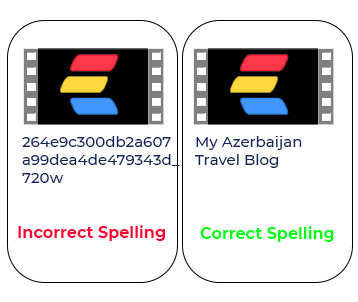
In the second step, we will obtain our keywords from the tags section of the video in YouTube Studio. For this, it is necessary to go to the tags section in the video settings. We write the keyword we obtained in the tags section.
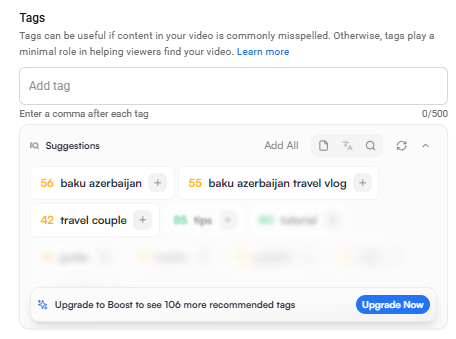
Before sharing the video on YouTube, since we wrote a travel-themed title, the vidIQ tool automatically analyzes the topic of our video and suggests appropriate keywords that we can use. By clicking the “+” sign next to the required keyword once, we can easily add that keyword to the tags list.
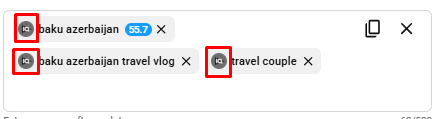
After adding the keyword to the tags, by clicking the vidIQ button next to it once, we can also see other keywords that are close to and related to that keyword.
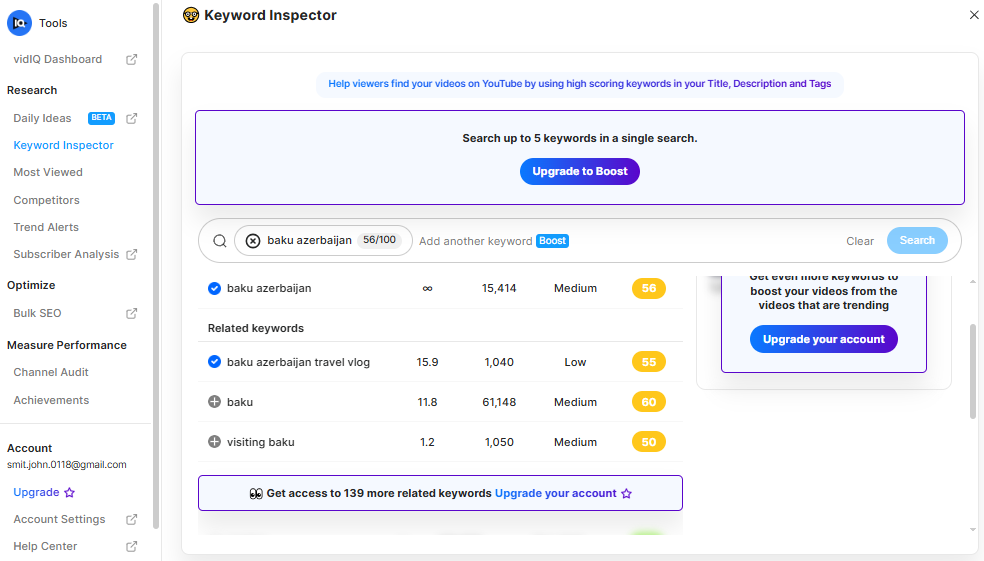
On the page that opens, we can also add those keywords by clicking the + sign in front of the keywords with high search volume.
We can obtain keywords not only from the tags section of the video you will share, but also from the tags in the videos of competitor channels. For this, it is necessary to look at the one that is suitable for you among the videos of competitor channels. In the vidIQ panel on the right side of the video, you can see which keywords that video uses in the tags.
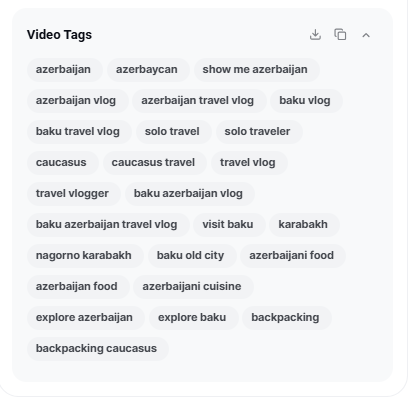
In the section where the keywords are located, it is possible to download the keywords as a CSV file by clicking the arrow icon at the top once. However, this function is active only in the vidIQ Premium version. If you are not using the Premium version, you cannot benefit from this opportunity. To get the vidIQ Premium version, click here. The Premium version offers more time-saving shortcuts of this kind. If you are using the free version, you can copy all keywords in bulk by clicking the copy icon next to the arrow icon once.
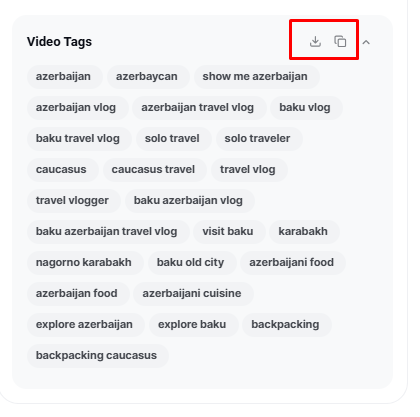
After copying the keywords, you can paste them into the tags section of your YouTube video. Then, by clicking the X sign next to the keywords that are not suitable for you, you can delete those keywords from the tags list.
When choosing keywords, it is not mandatory to strictly adhere to grammatical correctness. For example, it is possible to search with misspelled forms such as “travel” instead of “travel,” and this method sometimes helps to find more and different keyword variants. In general, it is possible to add tags up to 500 characters for YouTube. Therefore, when adding keywords to tags, it is recommended to add both grammatically correct forms and possible misspelling variants that users may type during search.
For example: “travle, travel, trvael, traveel” If you pay attention to this spelling when adding tags to your video, you will increase the probability of your videos appearing at the top of search results.
Keywords are not only limited to tags; hashtags also perform the function of keywords. A hashtag is a keyword or group of keywords written with the “#” sign to indicate a specific topic on social media. Correct use of hashtags in YouTube videos can positively affect the increase in the performance of the video.
Instead of writing hashtags in the video title, it is more purposeful to use them within sentences in the video description (description) section. We will add hashtags especially in the description section. When writing hashtags, it is not allowed to use special Azerbaijani letters such as ə, ı, ü, ğ, ş and to leave spaces between words. In hashtags, words are written either together, or the underscore “_” sign is used between two words.
Aynı kurallara bağlı kalarak bu satırı da İngilizce anahtar kelimelerle şöyle çevirebilirsin:
Incorrect spelling: #Travel videos , #travel vlogs
Correct spelling: #travel #travelvideos #travel_vlogs
It is also possible to find the keywords used by the channels you see as competitors from the description section of the videos on these channels. However, for now we will research hashtags from the description section of our own YouTube video. For this, it is enough to write any word related to the video by putting the # sign in front of the keyword you want to search for in the video description section.
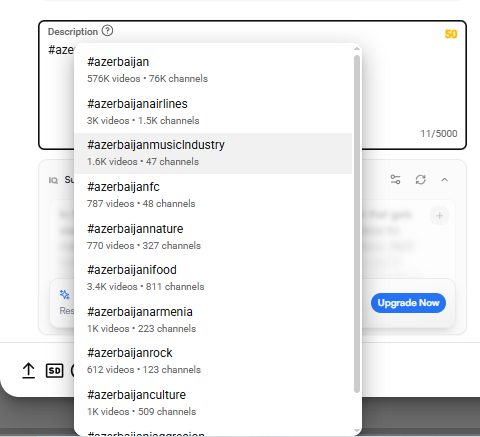
After typing the keyword, it is possible to see which hashtags suitable for that word exist and how many channels and how many videos use these hashtags. From here, you can choose the hashtags that are suitable for you and have high usage volume. However, hashtags that are not suitable for your video and are chosen only because they are widely used will not provide you with real benefit. For this reason, be sure to use hashtags that are directly related to the topic of your video.
Rules for using keywords and hashtags in YouTube videos.
Up to this part of the lesson, we only did research. Now we will use the information we obtained. I recommend using three to four, maximum five keywords in the title and description. Adding more keywords may look like spam. Using keywords naturally within sentences rather than just as a list is more effective. For example, if the video we want to share is a vlog about “Azerbaijan travel,” our main keywords will be “Azerbaijan,” “travel,” and “vlog.” Using these keywords, we can construct the title as follows:
“Something like this happened to me on my Azerbaijan trip – Azerbaijan travel vlog Part 1”
The title should not consist only of keywords; it should also arouse curiosity in the viewer. Then we should write the description section of the video. There should be a short text related to our video in the description, and within this text, it is necessary to use the keywords both as normal words and as hashtags (#).
For example:
In this video, you will watch what happened to me in Azerbaijan. I would like to state that my #azerbaijan #travel vlog continues. Do not forget to subscribe to the channel and turn on notifications to be informed about my next videos.
In the description section, only this kind of short text is not sufficient. You can add both your social network links and the links of your other YouTube videos here. In this way, you can direct viewers to your social network accounts and also encourage them to watch your other videos. Description texts written in this way will increase the SEO performance of your YouTube videos and directly your YouTube channel. This will lead to you becoming popular in the YouTube world.
Extra information
You can research keywords not only with vidIQ but also with other SEO tools. I list below other sites where you can do keyword research.
- Google Ads Keyword Planner
- TubeBuddy
- Keywordtool.io
- AnswerThePublic
Thus, in this lesson, you learned the importance of keyword research for your YouTube videos and how you can find and use keywords through the vidIQ SEO tool. By applying this information, you can ensure that your videos are more visible in searches and that your number of viewers increases.