
Free YouTube Money Making Course – Lesson
You can find hundreds of videos on YouTube about creating a YouTube channel. If you have no knowledge about opening a YouTube channel from scratch, you can watch the video below to open your channel. In this article, I will not explain step by step how to open a channel. Instead, I will present what you should pay attention to when opening a channel.
To open a YouTube channel, you must first have a Google account (Gmail). If you do not have a Gmail account yet or want to create a new account, in this video you can learn step by step how to create a Google account. After creating your Google account, in the next video you will learn how to open your YouTube channel.
When opWe recommend that before watching the “How to Open a YouTube Channel” video, you carefully read this lesson to the end. Learn the points you need to pay attention to in the lesson, then watch the video and easily create your YouTube channel.
When opening a channel, considering the following segments will be useful for you:
- YouTube channel name
- A symbol that will identify you (Logo)
- Channel cover image
- Channel description
- Your YouTube channel tags
- Viewer age restriction
- YouTube Channel Name
When opening a YouTube channel, you should pay attention to making your channel name memorable. Avoid very long and incomprehensible names. The channel name should either be your own first and last name or directly related to the videos you will produce. You can get inspiration by looking at the names of other channels in the category you choose. In addition, you can use artificial intelligence tools like ChatGPT and Google Bard to get inspiration when creating your channel name. A name you define today can become your brand tomorrow. Therefore, you must be extremely careful when choosing a name.
A Symbol That Will Identify You (Logo)
Your logo will be the emblem of your channel, a symbol. If you do not have the skill to create a logo, you can order a logo from professional designers in Facebook designer groups. Your logo should be memorable, attractive, and compatible with your channel’s name and content. Frequently changing your logo may cause people not to recognize you. Therefore, it is recommended to choose one logo and use it consistently. Do not use the first logo you find on the internet for your YouTube channel. This is both unethical and can cause serious problems due to copyright infringement. Remember that unlike real life, rights are fully protected in the virtual world.
Channel Cover Image
You can change your channel cover image at any time. Unlike the logo, the cover image is part of the channel design. In the future, you can also place advertisements in the cover image section. In addition, the cover image can be used as a banner to inform about your future plans or as a banner advertisement for special campaigns. However, try not to leave the cover image section empty.
Channel Description
The section where you can provide information about your channel is considered the channel description section. Here, you can provide information about your channel or include your contact details for people who want to collaborate with you in the future. However, the channel description should not be just a bunch of words. When writing this text, it should be written according to YouTube SEO rules. Newly opened YouTube channels have a very low chance of appearing in search results. A correctly written description text will give your channel a chance to appear in search results.
Note: You may see that popular channels have very little or no text in the description section. Do not be surprised by this. These channels do not need an SEO-compatible description text because they are already popular. After becoming a popular YouTube channel, you can remove the long description and add short texts instead.
If your channel will be global, you can write the channel name and description text in different languages. You can watch the video below to see how to do this.
Your YouTube Channel Tags
I can say that channel tags are one of the primary factors that help your channel appear at the top of searches. Here, you should use tags related to your channel name as well as your content. If your channel name contains the letters ə, ö, ü, ı, ş, you should use both these letters and their equivalents (e, o, u, i, s) in the channel tags.
Example: Let’s assume our channel name is “Eastern Culture.” For this channel, we can write the following tags:
Eastern, culture, civilization, eastern culture, vestern culture, vestern civilization
Viewer Age Restriction
If your channel is specifically for children, you need to set an age restriction here and indicate that the channel is generally for children. If you don’t know how to do this, you can make your channel specifically for children by following the steps below.
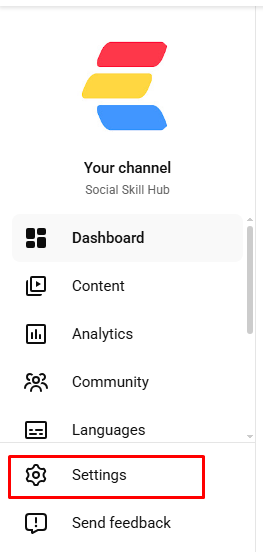
- Step 1: Go to YouTube Studio
- Step 2: Click on settings from the left menu
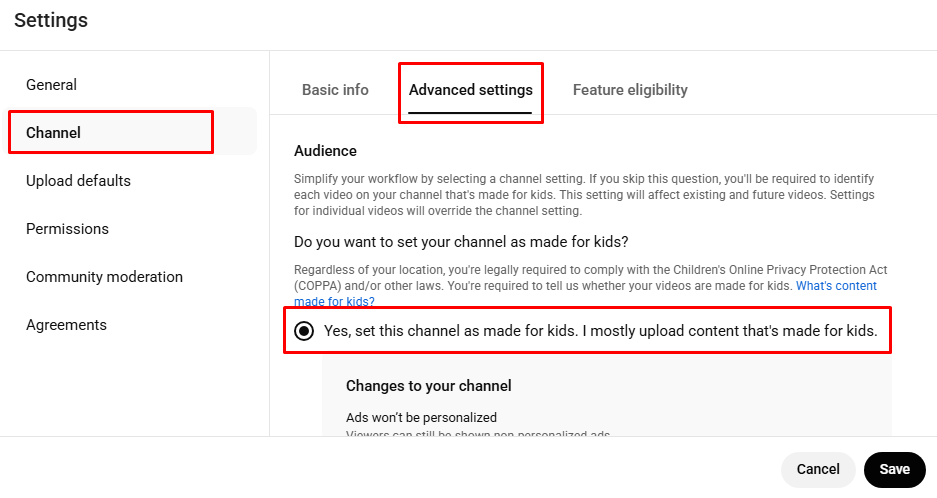
- Step 3: Click on the Channel section
- Step 4: Click on Advanced settings
- Step 5: Yes, set this channel for children only. Most of the videos I upload are for children. Select the option and click Save.
If you do not make videos specifically for children but your videos are for 16+ or 18+ audiences, you should also indicate this. Even if you do not indicate it, YouTube’s algorithm may set an age restriction on your video in the future. In some cases, YouTube imposes restrictions and minor penalties on channels that do not have an age restriction but post dangerous videos. To avoid encountering such situations on your channel in the future, I recommend paying attention to these matters.
As the proverb says, “Drop by drop, a lake is formed.” When opening a YouTube channel, pay attention to every small detail. The smallest change or addition you make can be the tiny drop that creates the lake.