


Free YouTube Monetization Course – Lesson 18
Attention: Because YouTube Studio does not work properly in the Azerbaijani language and in order to be more understandable for you, I indicate the names of the analytics sections in Turkish.
The secret of the growth of YouTube channels is not only sharing videos regularly. All successful YouTube channels that have a large audience today have reached this level by making small but continuous changes. Moreover, these changes are not the result of random decisions, but the result of correct decisions made by analyzing their videos and general channel metrics. For this reason, the Analytics page in YouTube Studio plays a very important role. Thanks to the statistical information here, you can see the real status of your channel, understand which points you need to improve, and take the right steps.
In our previous lesson, we explained in detail how you should analyze a “YouTube video.” If you have not read that lesson, it is recommended that you definitely take a look. In this lesson, you will learn how to read and correctly interpret the general analytics of the YouTube channel. For this, first log in to YouTube Studio and go to the Analytics (Analitik) page from the menu on the right side. From here, you can start analyzing the general performance of your channel.
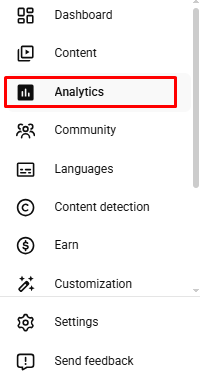
On the Analytics page, we will see 5 sections.
- Overview
- Content
- Audience
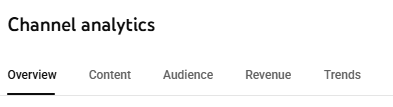
From these sections, the “Revenue” part shows the estimated earnings you obtained from your YouTube channel. The “Trends” section helps you find new video ideas by presenting concepts close to the topic of your channel and other videos your viewers watch. However, our main purpose is to analyze the general analytics of our channel. Therefore, we will focus on the three main sections you see in the image: “Overview, Content, and Audience.” Let’s learn together which metrics we should pay particular attention to in these sections and how we can improve our channel in line with the information we obtain.
Overview in YouTube analytics
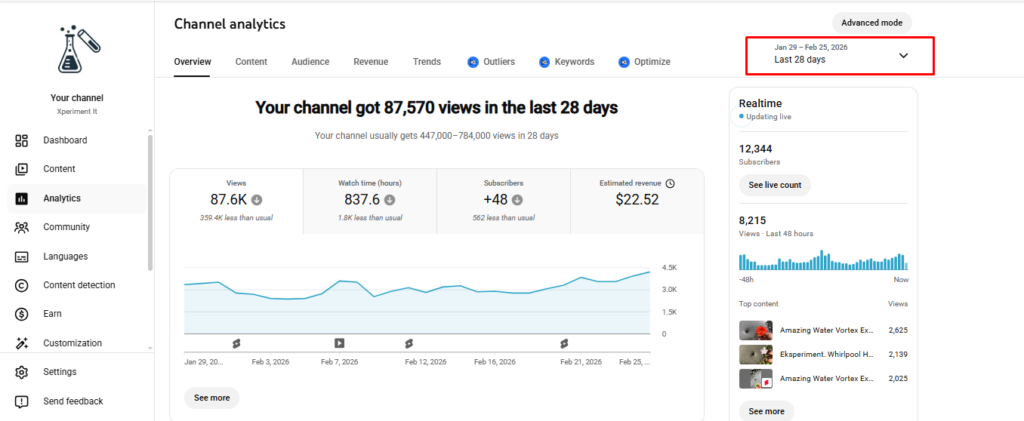
This section presents basic information about the general status of your channel. Here, within the last 28 days of your videos, you can see:
- how many times in total they were viewed,
- how many hours they were watched,
- how many new subscribers you gained,
- approximately how much revenue you earned.
The “Overview” section presents the same basic metrics both in the general analytics of the channel and in the analysis of each individual video separately. However, in the “Overview” part of a specific video, by analyzing the estimated revenue, you can determine which topics of videos earn more. This information helps you choose video topics more strategically in the future. That is, you can identify topics that generate more revenue and especially shoot videos in that direction.
Let us note that when you enter the YouTube Studio analytics section, the system automatically shows the last 28 days. By using the date range selection located in the upper right corner, you can view analytics according to the period you want.
Content in YouTube analytics
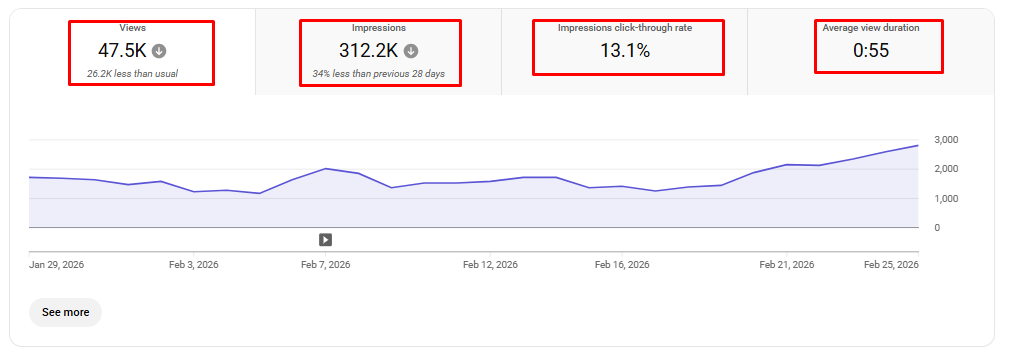
In the “Content” section, you can see your most popular videos according to the date range you selected and obtain customized analytics information about each video. If you share both standard YouTube videos and YouTube Shorts videos on your YouTube channel, you can analyze these video types both together and separately.

For example, let’s assume that you are analyzing your standard YouTube videos of the last 28 days. In this case, you can see:
- which of your videos received how many views,
- your most watched video in that date range,
- the average watch time of the videos,
- how many times they were shown (impressions),
- how many times they were clicked (CTR).
In addition, you can clearly see in this section where your viewers discovered you from. That is, you can analyze whether people decided to find and watch your video:
- from the YouTube home page,
- through the links you shared on social media,
- or from among the recommended videos.
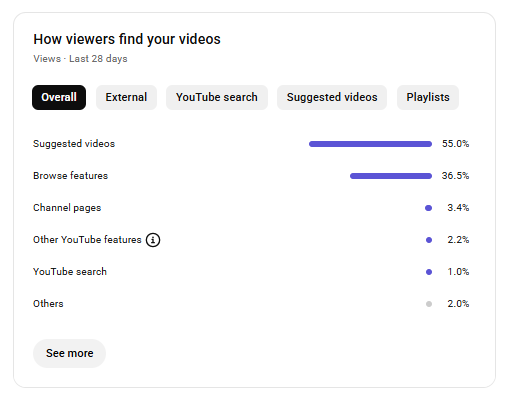
This information helps you understand which sources work more effectively and enables you to plan more accurately where you should share your content. In the image above, you can see how the viewers of a channel discovered that channel’s videos.
Let me give you an important success tip here. A large portion of the viewers of channels that are successful or progressing toward success come from the “Recommended videos” section. This shows that the YouTube platform actively recommends your videos to other users. This mechanism is one of the strongest factors in the growth of the channel. Generally, YouTube home page and YouTube searches come next. If in the analytics section you see in the top three:
- “Recommended videos,”
- “YouTube searches,”
- “YouTube home page”
sources, this shows that the work you are doing on your channel is progressing in the right direction.
Audience in YouTube analytics
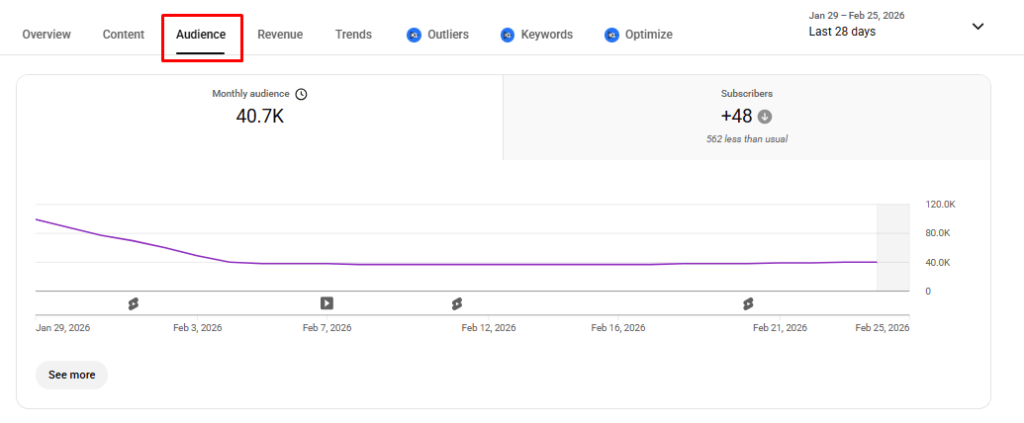
The Audience section presents detailed statistical information about your viewers. In this section, you can see demographic indicators such as which countries or regions your audience is from, age range, gender (female or male). This information helps you better understand who your viewers are and plan your videos in line with their interests.
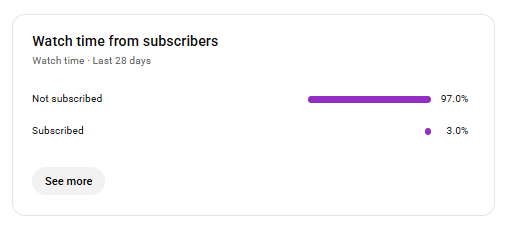
In addition, it is also shown how many of those who watch your videos are subscribed to your channel and how many watch without subscribing. These indicators allow you to determine which steps need to be taken for the growth of the channel. For example, you can emphasize calls to action to subscribe more effectively in videos.
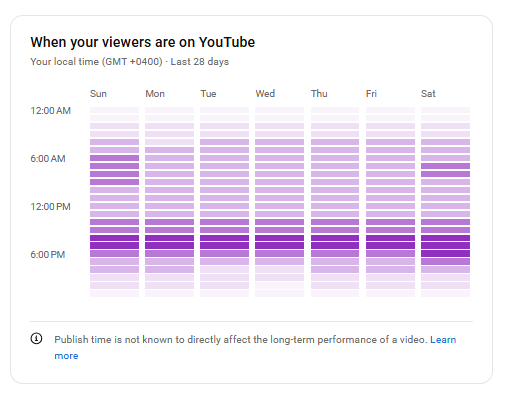
Another important feature is that it shows the hours when your viewers are most active on YouTube. In line with this information, sharing videos or live broadcasts at the times when your audience is most active helps increase the number of views and interest in your channel.
Finally, I would like to note that regularly following and analyzing your channel’s analytics is important for development. However, do not forget: focusing excessively on analytics does not mean that it will automatically bring big results. The numbers guide you, but the main factor that brings success is the video itself. The most important element is that your videos arouse interest and excitement in viewers and are worth watching. In other words, the basic secret of success is hidden in the quality and attractiveness of the videos. Analytics is a tool that helps to further improve this process.