

Free YouTube Monetization Course – Lesson 17
It is good to analyze that video 48 hours after sharing a video on YouTube. YouTube bots continuously index videos for 48 hours, and it becomes possible to obtain the most comprehensive information exactly after 48 hours. The analyses give you the first information about your video. Thanks to this information, you can measure what kind of impression your video creates on the viewer and the reaction of those who watch your video to the video. The information obtained from YouTube analytics will show what you should or should not do in the preparation of your future videos. Thus, you can reveal your weak and strong aspects in YouTube video production. The important thing is to read the analytical indicators in YouTube analytics correctly and to be able to evaluate them correctly. Let’s learn together which metrics we will examine in YouTube analytics.
YouTube video analysis step-by-step explanation
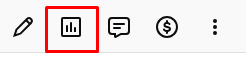
In YouTube Studio, you will see 5 buttons under the part where the name of your videos is written. If you click the second button from left to right, you will be directed to the analytics page of that video.
After the video analytics page opens, many numbers, buttons, and measurement metrics appear before us. There are a few metrics we need here. First of all, there are 4 sections we will see on the analytics page. These are Overview, Reach, Engagement, and Audience sections. If the monetization function of your channel is open, you will additionally see the Revenue section here. Each of these sections gives separate and different information from each other.

Here, mainly two metrics are required. One is Overview, and the other is Reach. If monetization is active on your channel, it is also useful to follow the Revenue metric. We do not take a look at the other two metrics, which are Engagement and Audience metrics. Because the information obtained from the Overview and Reach metrics is sufficient, and we can obtain almost all information about the channel from these two metrics. If we analyze this information correctly and make correct decisions, it is possible to see a serious increase in the performance of both the videos and the channel. As a result, your viewer count will increase and you will obtain more income from your videos.
Overview metric in YouTube analytics
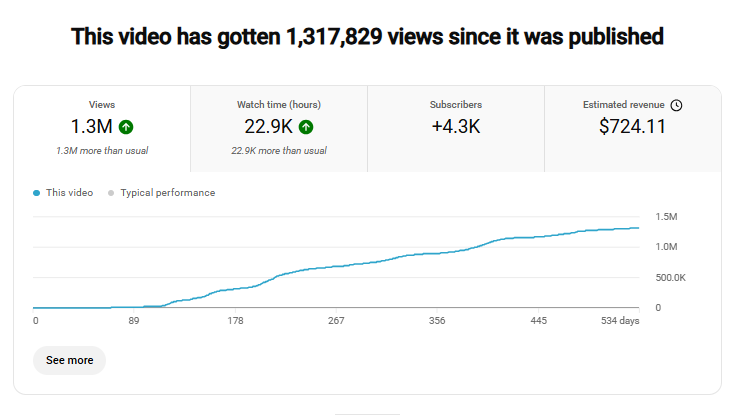
In the Overview section, we can get information about the general viewer impressions of our video. Views, watch time (hours), subscribers, and Revenue metrics form the basic information. Thanks to this information, we can see how much the video has been watched and how much it has earned since the video was shared. How many times our video has been watched in total, how many total hours of watch time have been obtained from these views, and how many subscribers we gained thanks to that video; we can see all of these.
If we scroll the page down a bit, we can encounter another metric. This metric, called Audience retention, shows how many minutes on average your video is watched. My recommendation is that you carefully analyze in which parts of the video the viewer count decreases. If viewers leave the video at certain points, determine what is missing in that section or the elements that cause the viewer to lose interest. In future videos, you can ensure that viewers watch the video for a longer time by applying changes such as making the introduction of the video more attractive, showing the main message first, improving the tempo and editing.
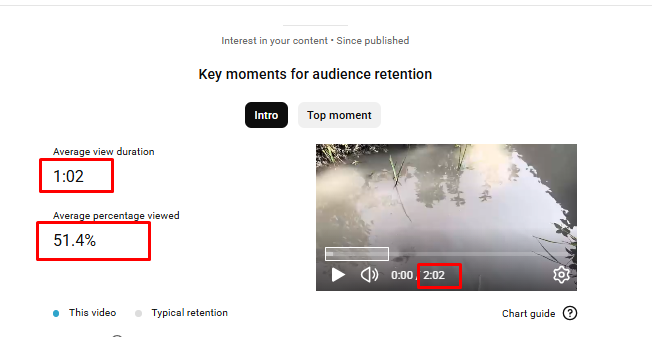
In this screenshot, we see that a 2:02-minute video is watched for an average of 1:02 minutes. As a percentage, this is approximately 51.4%. This indicator is good, because more than half of the viewers have watched more than half of the video. But it is possible to increase these numbers even more by making a little effort. In future videos, the following can be paid attention to in order to do this:
- Increasing video quality,
- Improving audio quality,
- Removing boring parts in the video,
- Keeping the video shorter and more attractive instead of making it longer,
- Increasing the tempo of the video,
- Conveying the message we want to give clearly and without delay.
These simple changes will help increase viewer attention and increase average watch time.
Reach metric in YouTube analytics
In YouTube analytics, the Reach metric shows how correct the SEO work you did on the video is. Let’s pay attention to the screenshot below.
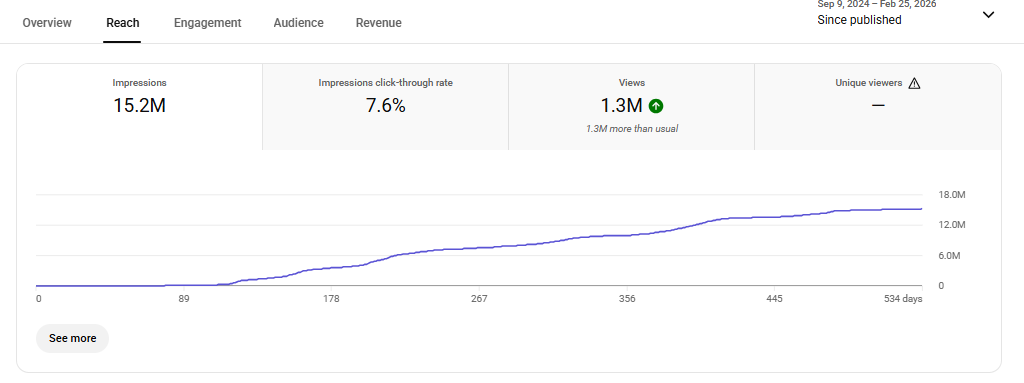
In this screenshot, there are 4 metrics. Impressions show how many times your video was shown; impression click-through rate shows how many of those impressions were clicked; views show the actual number of watches. In the example above, the impression click-through rate is 7.6%. This means that the video was shown to many people, but the vast majority were not interested and did not click the video. For example, out of 15.2 million impressions, only 1.3 million views occurred. From this, the following conclusion is drawn: The video description text and tags were written in accordance with the title, but the thumbnail image or the title of the video did not attract people’s attention. In this case, it is necessary to make changes to the title and the thumbnail image. Thus, you can increase the click and view count of your video.
If you scroll the page down a bit, you can also see where your viewers saw and clicked your video. As in the screenshot below:
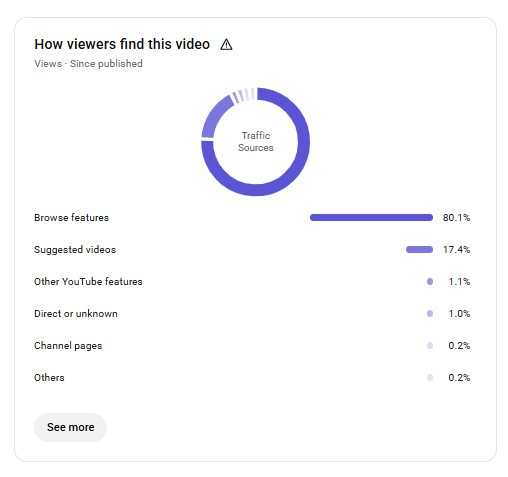
In the screenshot above, we can see from which channels on YouTube the views of the video came. Suggested videos are the videos suggested on the right side or below the screen while a viewer is watching another video. If most of the views come from suggested videos, this shows that the video is recommended to people by YouTube and that the SEO work done for the video is successful.
Browse features show the views coming from the YouTube home page, the views coming from notifications and the subscriptions section. Let’s note that with the change made in the YouTube algorithm in 2024, the videos of channels with few subscribers started to be shown to people who are not subscribed to that channel. This is a big advantage for new channels. However, in order to be shown to others by the algorithm, the SEO work on your video on YouTube must be done correctly. Views coming from channel pages show that a viewer first watched another one of your videos and then entered your channel and watched that video.
If you scroll the page down a bit, you can also see from which sources outside YouTube the video was watched.
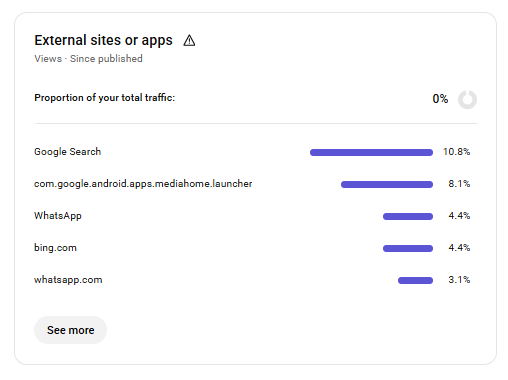
If you remember, in our lesson “What is YouTube SEO?”, we said this: “If you are doing SEO work for your YouTube video, this is SEO work not only for the YouTube search system, but also for other search systems.” You can see an example of this in the screenshot above. Most of the video’s views came from Google and Bing searches.
You may also have shared your video link on various sites, social networks, and mobile applications such as WhatsApp and Telegram. By looking at these metrics, you can learn which platform brings more views. Thus, you can increase your viewer count by sharing each new video on those platforms.
At the bottom of the page, you can see in which videos belonging to other channels your video is suggested.
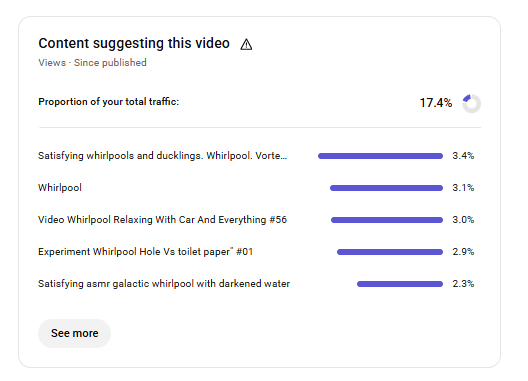
Thus, you can understand whether you used your video’s description, tags, and hashtags correctly. For example, let’s assume you shared a video about a recipe, but the video appears among automobile or game videos. This means that you did not write something correctly in the description text, tags, and hashtags and that YouTube bots added your video to the wrong category. In this case, there is no need to delete and re-share the video – when you re-upload it by just correcting the title, description text, tags, and hashtags, the video will appear in the correct category.
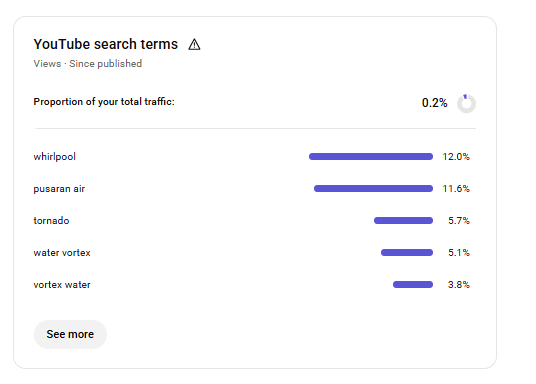
If you are shooting lesson or explanatory videos and your videos are searched a lot by people, I recommend that you analyze the “YouTube search terms” metric. Here, you can see with which keywords users’ searches cause your video to appear in search. If the keywords you obtain are compatible with your channel’s concept and topics, you can use them in your next videos. If your videos are not highly searched videos, there is no need to be specifically interested in this metric.
It is not possible to make a special analysis in the Revenue metric, because you cannot intervene in the ads that appear on YouTube videos or choose which ads will appear. The main purpose of this metric is to show how much the video has been watched and how much income it has generated. Therefore, there is no need to spend much time on the revenue metric.
We also complete this lesson here. I hope there is no point left dark for you regarding the analytics of YouTube videos. Remember, the main purpose of analyzing videos is to present better videos to the viewer. For this reason, just looking at the metrics is not enough. Always ask yourself: “How can I make my next video better? What can I do to make my video more interesting for people?”